Complex UI elements
This example combines several Animation module features in a single UI: a collapsible sidebar, an expandable card, and draggable elements.
To run it, install the FontAwesome fonts in your project:
> purgetss icon-library -v=fa
Then use this sample:
<Alloy>
  <Window class="exit-on-close-false portrait bg-purple-700">
    <Animation id="draggableAnimation" module="purgetss.ui" class="bounds:m-4 bounds:mb-20" />

    <!-- Sidebar -->
    <Animation id="sideBarAnimation" module="purgetss.ui" class="close:w-24 duration-150 open:w-72" />
    <Animation id="sideBarAnimationChevron" module="purgetss.ui" class="close:rotate-0 duration-150 open:rotate-180" />

    <View id="sideBar" class="ml-2 h-1/2 w-24">
      <View class="vertical ios:shadow-lg mr-8 rounded-lg bg-white" ios:onSingletap="doAction" android:onClick="doAction">
        <View class="grid-flow-row">
          <View class="ml-0 w-64 grid-rows-7">
            <View class="horizontal bg-selected-purple-100 items-center" action="home">
              <Label class="touch-enabled-false fas fa-home ml-0 h-full w-16 border-transparent bg-transparent text-center text-xl text-purple-700" />
              <Label class="touch-enabled-false text-purple-700" text="Home" />
            </View>
          </View>

          <View class="ml-0 w-64 grid-rows-7">
            <View class="horizontal bg-selected-purple-100 items-center" action="profile">
              <Label class="touch-enabled-false fas fa-user ml-0 h-full w-16 border-transparent bg-transparent text-center text-xl text-purple-700" />
              <Label class="touch-enabled-false text-purple-700" text="Profile" />
            </View>
          </View>

          <View class="ml-0 w-64 grid-rows-7">
            <View class="horizontal bg-selected-purple-100 items-center" action="messages">
              <Label class="touch-enabled-false fas fa-comment ml-0 h-full w-16 border-transparent bg-transparent text-center text-xl text-purple-700" />
              <Label class="touch-enabled-false text-purple-700" text="Messages" />
            </View>
          </View>

          <View class="ml-0 w-64 grid-rows-7">
            <View class="horizontal bg-selected-purple-100 items-center" action="help">
              <Label class="touch-enabled-false fas fa-question-circle ml-0 h-full w-16 border-transparent bg-transparent text-center text-xl text-purple-700" />
              <Label class="touch-enabled-false text-purple-700" text="Help" />
            </View>
          </View>

          <View class="ml-0 w-64 grid-rows-7">
            <View class="horizontal bg-selected-purple-100 items-center" action="settings">
              <Label class="touch-enabled-false fas fa-cog ml-0 h-full w-16 border-transparent bg-transparent text-center text-xl text-purple-700" />
              <Label class="touch-enabled-false text-purple-700" text="Settings" />
            </View>
          </View>

          <View class="ml-0 w-64 grid-rows-7">
            <View class="horizontal bg-selected-purple-100 items-center" action="password">
              <Label class="touch-enabled-false fas fa-lock ml-0 h-full w-16 border-transparent bg-transparent text-center text-xl text-purple-700" />
              <Label class="touch-enabled-false text-purple-700" text="Password" />
            </View>
          </View>

          <View class="ml-0 w-64 grid-rows-7">
            <View class="horizontal bg-selected-purple-100 items-center" action="sign-out">
              <Label class="touch-enabled-false fas fa-sign-out-alt ml-0 h-full w-16 border-transparent bg-transparent text-center text-xl text-purple-700" />
              <Label class="touch-enabled-false text-purple-700" text="Sign Out" />
            </View>
          </View>
        </View>
      </View>

      <Button id="sideBarChevron" class="fas rounded-10 fa-chevron-right mr-1.5 h-10 w-10 border-4 border-purple-700 bg-white text-xl text-purple-700" ios:onSingletap="sideBarClicked" android:onClick="sideBarClicked" />

    </View>

    <!-- My Card -->
    <Animation id="myCardAnimation" module="purgetss.ui" class="open:h-(298) close:h-24 duration-150" />
    <Animation id="myCardAnimationChevron" module="purgetss.ui" class="close:rotate-0 duration-150 open:rotate-180" />

    <View id="myCard" class="mr-6 mt-6 h-24 w-8/12 rounded-lg shadow-lg">
      <View class="vertical rounded-lg bg-white">
        <View class="h-auto w-screen">
          <ImageView class="rounded-16 m-4 ml-4 h-16 w-16" image="https://randomuser.me/api/portraits/women/17.jpg" />

          <View class="vertical ml-24 h-auto">
            <Label class="ml-0 text-sm font-bold text-gray-800" text="Someone Famous" />
            <Label class="ml-0 text-xs font-bold text-gray-400" text="Website Designer" />
          </View>
        </View>

        <View class="rounded-1 mx-2 h-0.5 w-screen bg-gray-300" />

        <View class="bubble-parent-false mt-2 h-48 w-screen grid-flow-row" ios:onSingletap="doAction" android:onClick="doAction">
          <View class="ml-0 w-screen grid-rows-5">
            <View class="horizontal bg-selected-purple-100 items-center" action="profile">
              <Label class="touch-enabled-false fas fa-user ml-0 h-full w-14 border-transparent bg-transparent text-center text-xl text-purple-700" />
              <Label class="touch-enabled-false text-sm text-purple-700" text="Edit Profile" />
            </View>
          </View>

          <View class="ml-0 w-screen grid-rows-5">
            <View class="horizontal bg-selected-purple-100 items-center" action="inbox">
              <Label class="touch-enabled-false fas fa-inbox ml-0 h-full w-14 border-transparent bg-transparent text-center text-xl text-purple-700" />
              <Label class="touch-enabled-false text-sm text-purple-700" text="Inbox" />
            </View>
          </View>

          <View class="ml-0 w-screen grid-rows-5">
            <View class="horizontal bg-selected-purple-100 items-center" action="settings">
              <Label class="touch-enabled-false fas fa-cog ml-0 h-full w-14 border-transparent bg-transparent text-center text-xl text-purple-700" />
              <Label class="touch-enabled-false text-sm text-purple-700" text="Settings" />
            </View>
          </View>

          <View class="ml-0 w-screen grid-rows-5">
            <View class="horizontal bg-selected-purple-100 items-center" action="support">
              <Label class="touch-enabled-false fas fa-question-circle ml-0 h-full w-14 border-transparent bg-transparent text-center text-xl text-purple-700" />
              <Label class="touch-enabled-false text-sm text-purple-700" text="Support" />
            </View>
          </View>

          <View class="ml-0 w-screen grid-rows-5">
            <View class="horizontal bg-selected-purple-100 items-center" action="sign-out">
              <Label class="touch-enabled-false fas fa-sign-out-alt ml-0 h-full w-14 border-transparent bg-transparent text-center text-xl text-purple-700" />
              <Label class="touch-enabled-false text-sm text-purple-700" text="Sign Out" />
            </View>
          </View>
        </View>
      </View>

      <View class="rounded-tl-br-md wh-8 bubble-parent-false mb-0 mr-0 bg-blue-400">
        <Button id="myCardChevron" class="fas fa-chevron-down border-transparent bg-transparent text-white" ios:onSingletap="myCardClicked" android:onClick="myCardClicked" />
      </View>
    </View>

    <Label id="action" class="mx-4 mb-6 h-10 w-screen rounded-lg bg-purple-800 text-sm font-bold text-purple-50" />
  </Window>
</Alloy>
$.index.open()

$.draggableAnimation.draggable($.myCard)

function sideBarClicked() {
  $.sideBarAnimation.play($.sideBar)
  $.sideBarAnimationChevron.play($.sideBarChevron)
}

function myCardClicked() {
  $.myCardAnimation.play($.myCard)
  $.myCardAnimationChevron.play($.myCardChevron)
}

function doAction(event) {
  if (event.source.action) {
    $.action.text = `   Action: ${event.source.action}`
 }
}
If this window can close, add an onClose handler and call $.draggableAnimation.undraggable($.myCard) so the global orientation listener is removed.
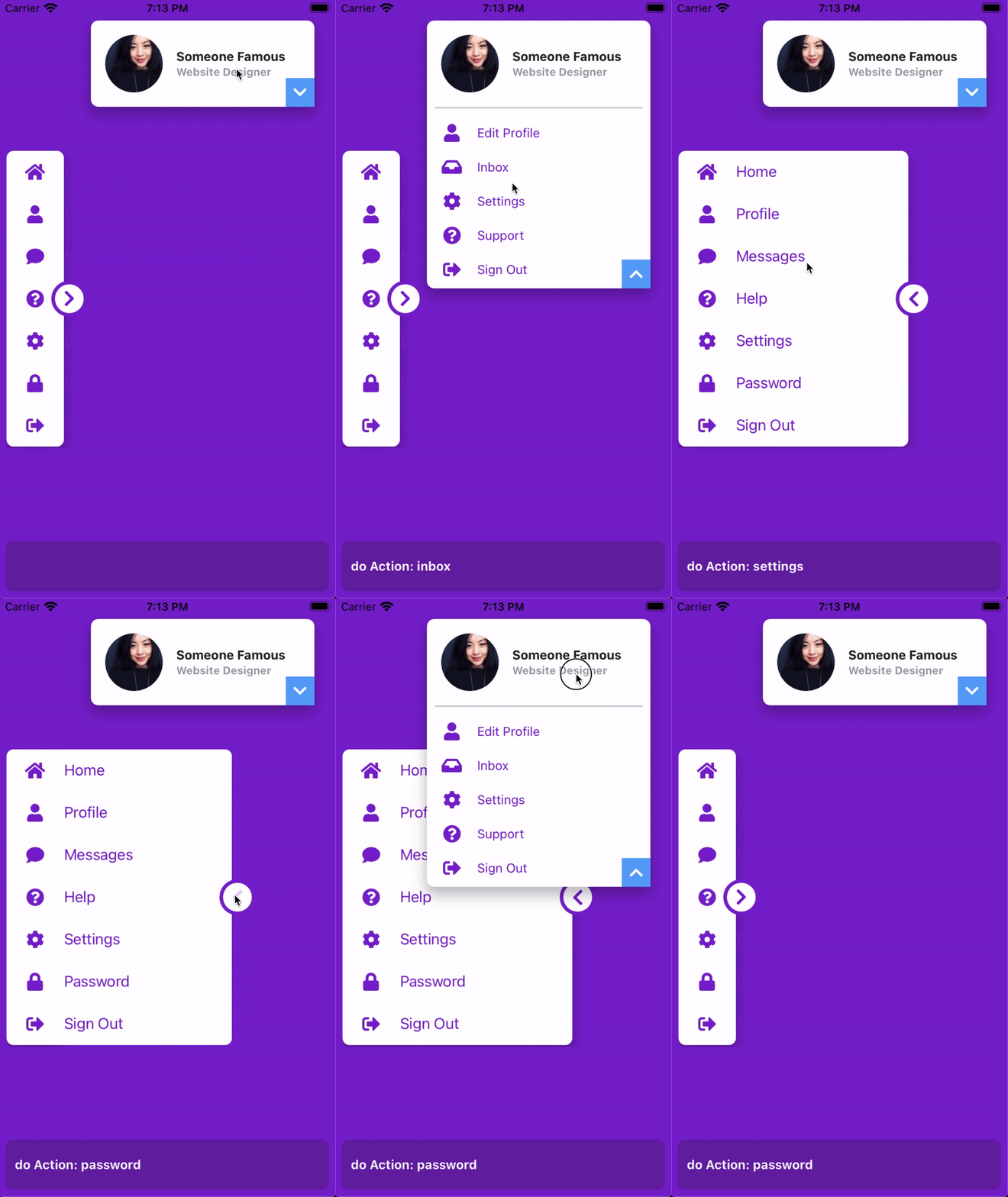
Low framerate GIF.
Titanium Classic
Compose these behaviors with native views and separate animation objects. Classic has no XML IDs or controller proxy, so keep direct references to each view.
const { createAnimation } = require('lib/purgetss.ui')

const sidebarMotion = createAnimation({
  duration: 150,
  animationProperties: {
    open: { width: 288 },
    close: { width: 96 }
  }
})
const cardMotion = createAnimation({
  duration: 150,
  animationProperties: {
    open: { height: 298 },
    close: { height: 96 }
  }
})
const dragMotion = createAnimation({
  bounds: { top: 16, right: 16, bottom: 80, left: 16 }
})

function toggleSidebar() { sidebarMotion.play(sidebar) }
function toggleCard() { cardMotion.play(card) }
function initializeInteractions() { dragMotion.draggable(card) }
function disposeInteractions() {
  dragMotion.undraggable(card)
  sidebarButton.removeEventListener('click', toggleSidebar)
  cardButton.removeEventListener('click', toggleCard)
  window.removeEventListener('open', initializeInteractions)
  window.removeEventListener('close', disposeInteractions)
}

sidebarButton.addEventListener('click', toggleSidebar)
cardButton.addEventListener('click', toggleCard)
window.addEventListener('open', initializeInteractions)
window.addEventListener('close', disposeInteractions)
Create window, sidebar, sidebarButton, card, and cardButton with the corresponding Ti.UI.create*() factories before attaching these handlers. The Classic guide shows the full setup and the property mapping used above.